davekoons.com / case studies / ledgersprout
LedgerSprout: bank statement PDFs to clean data, entirely offline
A commercial desktop app I designed, built and ship on my own. It converts bank and credit card statements to CSV, XLSX, JSON and OFX/QFX, and processes everything on the user’s own machine.
- Product
- ledgersprout.superdavelab.com · public beta (v0.10.x)
- Role
- Founder and sole engineer: architecture, parsing engine, UI, licensing, site, releases
- Platforms
- Windows (signed installer), macOS, Linux (AppImage, .deb)
- Stack
- Electron, Node.js, YAML parser and rule packs, local OCR, GitHub Actions
Why it exists
Most statement converters ask you to upload your financial history to their server. LedgerSprout has no upload, no account and no cloud: turn the Wi-Fi off and it works exactly the same. That guarantee is the whole product.
The hard part isn’t reading PDFs
Extracting text from a PDF is a solved problem. The hard part is that every institution lays out its statements differently, and changes the layout without warning. A single clever parser would break every time a bank redesigned a page.
So the parsing layer is a plugin-style registry. Each statement layout is a versioned parser package. A scoring pass picks the parser that fits a file best, and per-file diagnostics record exactly which parser was chosen and why. When a statement doesn’t clear the confidence threshold, LedgerSprout says so instead of quietly producing wrong numbers. Scanned, image-only statements go through OCR, which also runs locally.
Adding a bank in ten minutes
Writing parsers by hand was a debugging session every time. So I built a companion Parser Designer: drop in a real statement, mark the anchors and row patterns, and watch the matches highlight live. Adding a new institution went from a debugging session to about a ten-minute job.
A review step people can trust
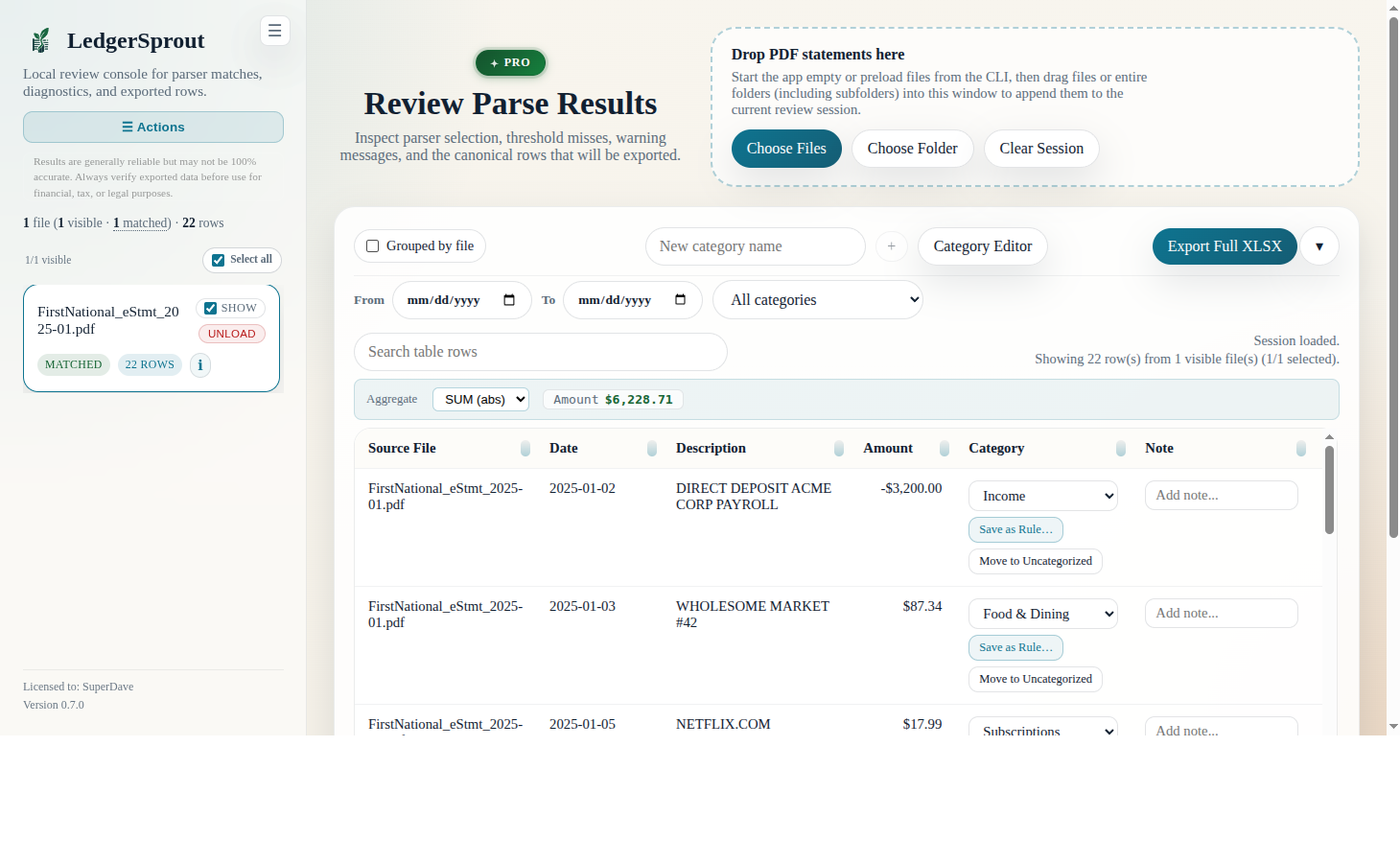
Parsed data goes to a review console before anything is exported: duplicate detection, confidence flags, and rule-driven tax categorization from installable category packs covering Schedule A and C. Categorization is fill-only by default. Installing a pack never overwrites a category the user set by hand, and never touches data imported from their own spreadsheets. An Insights tab exports a six-sheet session report.
One pipeline, two front doors
The same pipeline runs headless from a command-line interface, with the same output schema. A batch job produces byte-identical output to the desktop app, so a conversion can be scripted or done by hand and the results are the same.
Shipping it
- Tag-triggered GitHub Actions run a parser regression gate before anything is built.
- Cross-platform builds: a signed Windows installer, macOS, and Linux AppImage and .deb packages.
- Automated artifact deploy once the builds pass.
Its sibling: GridDock
GridDock applies the same
thinking to spreadsheets. Drag in a CSV, TSV, XLS or XLSX file and it infers an editable
table schema: integers, decimals, money, dates and right-sized strings, with nullability
taken from the actual data. Then it either writes a portable CREATE TABLE
script or imports the rows over the database’s own wire protocol into SQL Server,
PostgreSQL, MySQL/MariaDB or SQLite, with no ODBC or OLE DB driver to install. A preflight
against the target database reports what would fail before anything is written, and
saved recipes plus a headless CLI handle scheduled runs.
What this means for your project
If you need a desktop app, the unglamorous parts are most of the work: installers, code signing, auto-detection that explains itself, a review step users trust, and a release pipeline that won’t ship a regression. I’ve built all of them, on my own, and I can build them for you. The same goes for getting messy data out of PDFs and spreadsheets and into a database.